
Introduction
Administrative overhead now consumes more than 40% of total hospital costs, according to the American Hospital Association. Claim denials cost U.S. healthcare providers approximately $262 billion annually, with commercial denials up 20% and Medicare Advantage denials up 55% year-over-year.
Manual processes are the culprit. Registration errors, missing documentation, and preventable claim scrubbing failures eat into margins before the first patient interaction ends.
For finance and healthcare organizations, RPA (Robotic Process Automation) has shifted from optional to operationally necessary. This article covers what RPA actually does in a revenue cycle, where it delivers the highest ROI, how to roll it out in four phases, and what to measure to know it's working.
TLDR:
- RPA bots replicate human interactions with billing systems at machine speed, eliminating errors across the full claims workflow
- Preventable denials account for 82% of all rejections—RPA targets these root causes before claims leave your system
- Automation delivers 59% cost reduction and 86% productivity improvement, with ROI typically reached in under 12 months
- Implementation follows four phases: Discover and prioritize, design and build, test with real data, and deploy iteratively
What Is RPA in Revenue Cycle Management?
RPA uses software bots that replicate how a human employee navigates billing systems, payer portals, and electronic health records (EHRs). Bots enter data, check statuses, submit claims, and post payments—but at machine speed with near-zero error rates. Unlike traditional IT projects that swap out legacy systems, RPA layers on top of existing infrastructure—no replacement required.
The Three Pillars of RCM and Where Manual Bottlenecks Concentrate
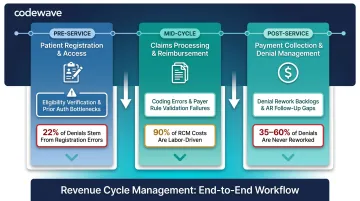
Revenue cycle management operates across three core pillars:
| Pillar | Stage | Key Bottlenecks | Impact |
|---|---|---|---|
| Patient Registration & Access | Pre-Service | Eligibility verification across payer portals, prior auth paperwork, coverage validation | Registration errors drive 22% of all claim denials — the single largest denial category |
| Claims Processing & Reimbursement | Mid-Cycle | Claims scrubbing for coding errors, missing documentation, payer rule validation | 90% of claims processing costs are labor; 10–20% of staff hours go to tasks automation can handle |
| Payment Collection & Denial Management | Post-Service | Payment posting from EOBs/ERAs, denial identification, appeal assembly, AR follow-up | 35–60% of denied claims are never reworked — a direct, permanent revenue loss |
Attended vs. Unattended Bots
RPA deployments typically combine two bot types:
- Attended bots: Triggered by a human action, used for tasks requiring judgment at specific steps (e.g., complex denial review where a bot assembles the appeal packet and a human decides whether to submit)
- Unattended bots: Run autonomously on schedules for high-volume repetitive tasks (e.g., nightly eligibility verification sweeps or payment posting from batched ERAs)
Mature RCM programs deploy both in combination—unattended bots handle volume, attended bots augment human decision-making.
Where RPA Makes the Biggest Impact: High-Value Use Cases
Eligibility Verification: $9.3 Billion Annual Savings Opportunity
U.S. medical providers processed approximately 14.8 billion eligibility and benefit verification transactions in 2023, with manual verification costing $7.97 per transaction versus $2.18 electronically—a $5.79 savings per check.
Bots navigate hundreds of payer portals automatically, verifying patient insurance coverage, benefits, and prior liability before appointments. For specialist providers, manual lookup consumes 20+ minutes per transaction; automation eliminates that entirely.
For a mid-size provider processing 50,000 eligibility checks monthly, manual verification costs nearly $400,000 per month. Automated verification cuts that to $109,000, a $290,000 monthly reduction from a single process.
Prior Authorization: 13 Physician Hours Per Week on 39 Weekly PAs
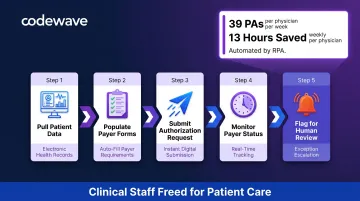
Physicians complete an average of 39 prior authorizations per week, spending approximately 13 hours on the process, according to the American Medical Association's 2024 survey. Manual prior authorization costs $10.97 per transaction versus $5.79 electronically, yet only 31% of prior authorization transactions are fully electronic. That's the largest automation gap among major revenue cycle processes.
RPA handles the full authorization workflow: pulling patient data from EHRs, filling payer forms, submitting requests, and monitoring status. Approvals, denials, and pending requests are flagged for human review, so clinical staff spend time on care decisions rather than administrative queues.
Claims Scrubbing and Submission: Catching 82% of Preventable Denials
Approximately 82% of claim denials are potentially avoidable, per Change Healthcare's 2022 Revenue Cycle Denials Index: 31% unequivocally preventable, 51% situationally avoidable. The national first-pass acceptance rate sits at roughly 88% against a 95%+ industry benchmark.
Bots validate claims against payer-specific rules before submission, catching coding errors, missing documentation, incorrect patient identifiers, and registration mismatches before they trigger a denial. First-pass acceptance rates improve measurably, cutting rework cycles that cost $5.65 per manual claim versus $3.10 electronically.
Top denial causes RPA addresses:
- Registration/eligibility errors (22% of all denials)
- Missing or invalid claim data (16%)
- Authorization/pre-certification issues (13%)
Denial Management and Appeals: $25–$181 Per Reworked Claim
The average cost to rework a single denied claim ranges from $25 to $181, yet 35–60% of denied claims are never resubmitted due to the administrative burden. RPA handles the triage: identifying denied claims, categorizing denial reasons, assembling appeal packets with relevant clinical records, and routing submissions. Billing staff focus on complex cases that require clinical judgment, not routine resubmissions.
Key rework cost benchmarks by payer type:
- Medicare Advantage denials: $47.77 per claim average
- Commercial denials: $63.76 per claim average
For a health system processing 3,000 denials monthly, that translates to $150,000–$543,000 in recovered revenue that would otherwise go unpursued.
Payment Posting: $701 Million Remaining Savings Opportunity
U.S. medical providers processed approximately 2.2 billion remittance transactions in 2023, with manual posting costing $4.76 per transaction versus $2.86 electronically. Bots post payments from EOBs and ERAs directly into billing systems, reconcile against invoices, and flag discrepancies for review. Cash flow accelerates and AR days drop. Because payment posting is rule-based and high-volume, it's typically the fastest automation win in a revenue cycle program.
How Codewave Identifies the Right Starting Point
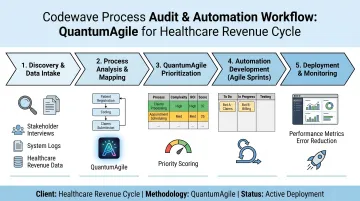
Codewave's QuantumAgile™ methodology moves revenue cycle teams from process audit to validated automation without the typical delays. Rather than automating everything at once, the approach targets the highest-impact process first, proves ROI with measurable results, then scales. For healthcare and fintech clients, that means working automation in weeks, not months.
Key Benefits of RPA for Revenue Cycle Performance
Cost Reduction: $258 Billion Avoided Annually Through Automation
U.S. healthcare avoided an estimated $258 billion in administrative costs in 2024 through electronic transactions, with a remaining $21 billion savings opportunity. Organizations implementing RPA reported a 59% cost reduction according to a Deloitte survey cited by HIMSS.
Healthcare financial leaders using automation in the revenue cycle reported an average cost-to-collect of 3.51% versus 3.74% for those without automation—translating to approximately $11.5 million in savings for a $5 billion health system.
Error Elimination and Cleaner Claims
Removing manual data entry from the equation reduces the error rate that causes denials. Organizations report 90% improvement in quality and accuracy after RPA implementation. The two biggest front-end culprits:
- Registration and eligibility errors account for 22% of all denials
- Missing or invalid data drives another 16%
Eliminating these at the source improves net collection rates and cuts rework cycles before they start.
Staff Productivity and Reallocation: 20% FTE Capacity Gains
RPA provides an average of 20% of full-time equivalent capacity, with organizations reporting 86% improvement in productivity. Bots handle high-volume transactional work, freeing skilled staff for complex denials, payer negotiations, patient financial counseling, and denial prevention initiatives.
For a 10-person billing team, 20% capacity gain equals two full-time employees' worth of hours recovered monthly—reallocated to revenue-generating activities.
Faster Collections and Reduced AR Days
Automation shortens the gap between service delivery and payment by removing manual queues, missed timely-filing windows, and delayed submissions. Industry benchmarks to measure against:
- Days in AR: Under 40 days (MGMA standard); high performers target under 35
- AR over 90 days: Should represent less than 15% of total claims
Scalability Without Proportional Staffing Costs
RPA scales transaction volume up or down without hiring—critical for organizations experiencing growth, mergers, or seasonal claim surges. RCM department turnover rates range from 11% to 40%, and the Bureau of Labor Statistics projects medical billing and coding demand to grow 7% through 2031. Automation fills that gap, sustaining throughput even when headcount can't keep pace with volume.
How to Implement RPA in Your Revenue Cycle: A 4-Phase Approach
Phase 1: Discover and Prioritize
Map current revenue cycle processes end-to-end to identify where manual work concentrates, where errors originate, and which processes are high-volume and rule-based. Calculate the cost of inaction:
- Current error rates by process
- Rework hours and labor costs
- Denial costs and write-offs from timely-filing lapses
- FTE hours consumed by repetitive tasks
Prioritize by financial impact, not implementation ease. The easiest automation may not deliver meaningful ROI. Target processes where manual cost per transaction is highest and volume is substantial—eligibility verification, payment posting, and claims scrubbing typically top the list.
Phase 2: Design and Build
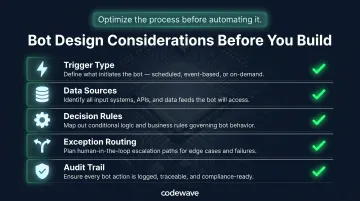
Design the automation workflow with clearly mapped decision points and exception-handling pathways before building a single bot. Optimize the process before automating it—bots executing a broken process will simply make it fail faster.
Key design considerations:
- What triggers the bot (schedule, event, human action)?
- Where does the bot pull data (EHR, billing system, payer portal)?
- What rules govern bot decisions (edit checks, validation logic, payer-specific requirements)?
- How are exceptions routed to humans (queue assignment, notification triggers)?
- What audit trail is required (HIPAA-compliant logging, credential management)?
Phase 3: Test with Real Data
Testing with actual production data—real payer portals, real claim types, real patient scenarios—is critical. Demo environments mask the variability that breaks bots at go-live. This phase must include:
- Security and credential management protocols (dedicated service accounts, encrypted vaults)
- HIPAA-compliant audit trails tracking every bot action
- Exception handling validation (what happens when a portal is down, a field is missing, or a payer rejects a submission format?)
- Performance benchmarking against pre-automation baseline
Phase 4: Deploy, Monitor, and Scale
Start with the single highest-impact process. Measure results against the pre-automation baseline. Expand iteratively based on proven outcomes.
Payer portals change, regulations update, and workflows evolve—RPA requires ongoing monitoring, not just a one-time deployment. Establish:
- Real-time performance dashboards tracking bot success rates, error logs, and throughput
- Scheduled bot health checks and credential rotations
- Process ownership and escalation protocols for bot failures
- Regular review cycles to identify new automation candidates
Codewave's ImpactIndex™ Model
Codewave's ImpactIndex™ ties engagements to specific revenue cycle outcomes: clean claim rate improvements, denial reductions, and hours recovered. Clients pay for those results—not for bots deployed or hours billed—so every automation phase is scoped around KPIs that move the financial needle.
How to Measure RPA Success: KPIs That Matter
Measuring RPA impact requires clear benchmarks — both to prove ROI and to catch performance issues before they ripple through your revenue cycle. These are the primary KPIs to track:
| KPI | Industry Benchmark | High-Performer Target |
|---|---|---|
| Days in Accounts Receivable | Under 40 days | Under 35 days |
| Clean Claim Rate | 90%+ | 95%+ |
| Initial Denial Rate | ~12% national avg | Under 5% |
| Cost-to-Collect | 3.74% average | 3.51% (with automation) |
| AR Over 90 Days | Under 15% | Under 15% |
| Timely Filing Compliance | 100% | 100% |
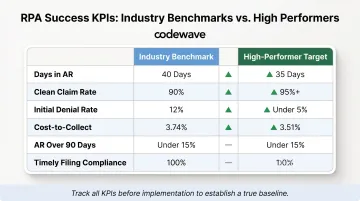
Start tracking before implementation to establish a true baseline. Without pre-automation benchmarks, ROI calculations are speculative and internal buy-in is harder to sustain.
Automate Reporting for Continuous Visibility
Automated reporting dashboards make these metrics visible in real time, enabling revenue cycle leaders to spot bot performance degradation early and course-correct before it affects financial performance. Key metrics to include:
- Bot success rate by process type
- Exception volume and resolution time
- Error logs and root cause analysis
- Cost per transaction trends
- Denial rate by category and payer
Common Pitfalls to Avoid When Deploying RPA
Automating a Broken Process
Bots execute whatever logic they're given. If the underlying workflow is flawed—redundant steps, unclear handoffs, inconsistent payer requirements—automation amplifies the flaw at machine speed. Process improvement must precede process automation.
Before automating, ask:
- Is this the optimal way to complete the task, or just the way we've always done it?
- Are decision points clearly defined, or do they rely on undocumented tribal knowledge?
- Does the process have consistent inputs and outputs, or does it vary by user?
Choosing a Vendor Without Domain Expertise
Even a well-designed process will stall if the implementation partner doesn't understand your environment. General-purpose RPA platforms lack the healthcare and fintech context needed to navigate payer portal variability, denial rework logic, prior authorization workflows, and coding compliance requirements. The wrong vendor won't just slow your rollout — they'll build bots that break under real-world conditions.
Evaluate RPA partners on these criteria:
- Have they implemented RPA in healthcare revenue cycle or fintech billing environments? Ask for client outcomes in denial reduction, AR days, or clean claim rates.
- Do they understand HIPAA requirements, PHI handling, audit trail standards, and payer-specific regulatory constraints?
- Can they integrate bots with your existing EHR, billing system, clearinghouses, and payer portals without major infrastructure changes?
Underestimating Change Management
Staff must understand how automation changes their daily work. Without clear communication and training, even well-built bots face resistance and underperformance. Budget for change management from day one.
Change management essentials:
- Explain how RPA reallocates staff to higher-value work, not eliminates jobs
- Train staff on monitoring bot performance, handling exceptions, and escalating issues
- Establish feedback loops so frontline users can report bot errors and suggest improvements
Frequently Asked Questions
What is RPA in revenue cycle management?
RPA uses software bots to handle repetitive, rules-based billing tasks—such as eligibility verification, claims submission, and payment posting—by mimicking human interactions with payer portals and billing systems, but at machine speed with near-zero error rates.
What are the 4 crucial phases of RPA?
The four phases map a clear path from audit to scale:
- Discover: Audit and prioritize processes by financial impact
- Design and Build: Map workflows and configure bots
- Test: Validate with real production data and HIPAA-compliant protocols
- Deploy and Scale: Go live with one high-impact process, then expand based on measured results
What are the three pillars of RCM?
The three pillars are patient access and registration (pre-service), claims processing and reimbursement (mid-cycle), and payment collection and denial management (post-service). RPA drives efficiency gains across all three stages.
Will RPA replace billing and finance staff?
No. RPA handles high-volume, repetitive tasks so experienced staff can focus on complex denials, payer negotiations, patient financial counseling, and denial prevention initiatives. The goal is redeployment of talent to higher-value work, not workforce reduction—especially given 11–40% RCM department turnover rates.
How long does it take to implement RPA in a revenue cycle?
Individual high-impact processes can typically be automated within 6–10 weeks with the right partner, covering discovery, build, testing with real data, and go-live. Broader multi-process programs scale over several months as each workflow is validated, optimized, and deployed iteratively.
What revenue cycle processes benefit most from RPA?
The highest-ROI starting points are eligibility verification, payment posting, and claims scrubbing. All three are high-volume and rules-based, consume significant manual staff time, and generate measurable error rates—making them easy to baseline and fast to show payback.